
Keep the statement’s exact label
The example shows $128,400 in unpaid principal. That is the loan balance shown on the statement. Confirm any arrears, or past-due amounts, separately.
AI Document Review
Analyze one file in Deal Files. Check the extracted details against the original and see which questions to ask before the deal moves forward.
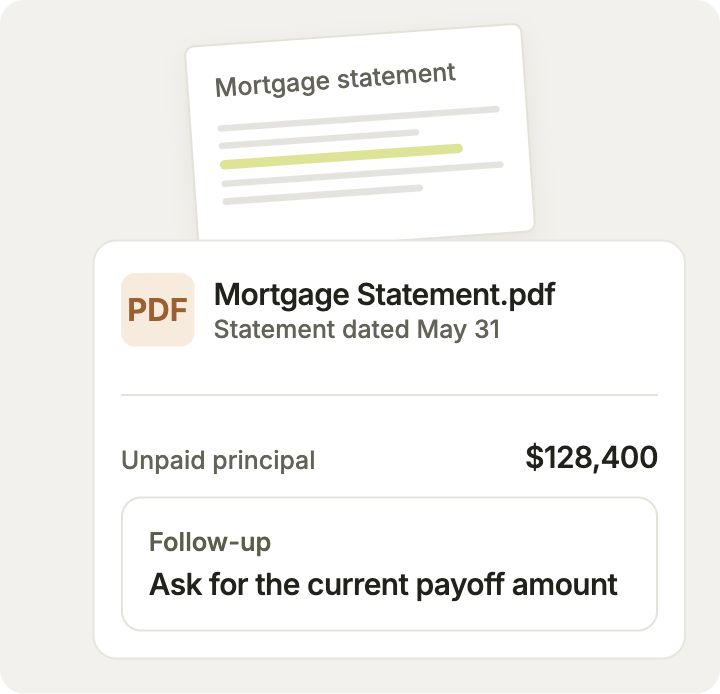
Illustrative example. Open a mortgage statement dated May 31 in Deal Files and select Analyze. Use the review to find the date and amount, then check both on the original.
The example shows $128,400 in unpaid principal. That is the loan balance shown on the statement. Confirm any arrears, or past-due amounts, separately.

Ask the lender for a payoff statement that covers the expected closing date. It can include interest or fees beyond the unpaid principal.
Start with a mortgage statement or payoff statement in PDF, JPG, or PNG. Open the file in Deal Files and run Analyze on one document at a time.
Compare each amount, label, and date with the original. If a value is missing, leave it open and ask the seller, lender, or title team to confirm it.
Check the original if any text is unclear or missing. Upload a clearer scan or ask for a fresh copy before relying on a number or date.
Return to the file in Deal Files and open its analysis. Share the source and the details you checked with the people working the deal.
Try a smaller copy with the full page in view. Check that dates and amounts remain readable after you resize it.